I am a candidate
Illustrated guides to move at your own pace, from your first sign-in to your next hire.
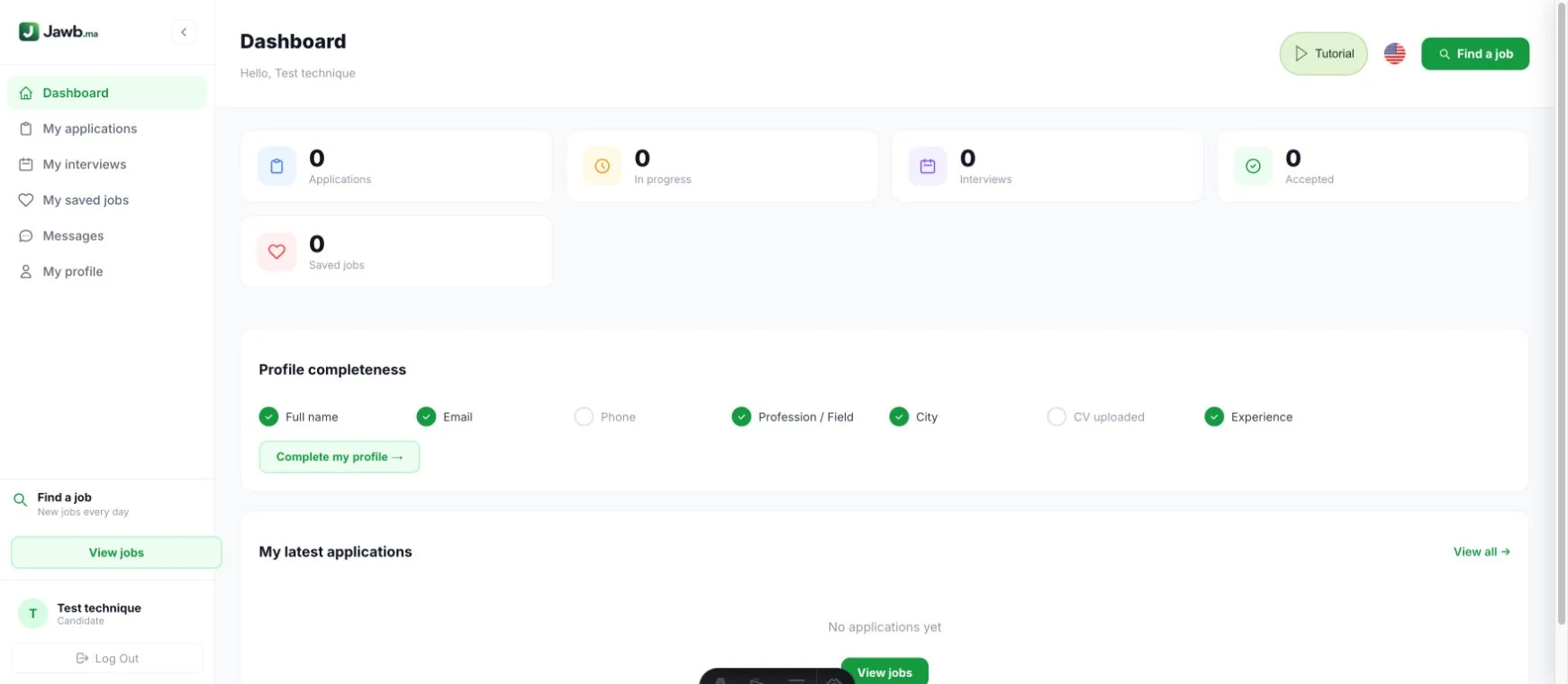
Find your way around
Your dashboard brings together applications, interviews and saved jobs. Complete your profile first, then use the menu to open each section. The Tutorial button remains available in the header.
Open this featureAll steps
Screenshots use a demonstration account with fictional data.
All steps
Find your way around
Your dashboard brings together applications, interviews and saved jobs. Complete your profile first, then use the menu to open each section. The Tutorial button remains available in the header.
Open this featureFind the right job
Open the job listings and combine job, city and contract filters. Read the full listing for the employer, responsibilities, skills and application method. Remove a filter if there are no results.
Open this featureApply for a job
Use the method available on the listing: form, WhatsApp, email or external link. Review your contact details and CV before sending. An application sent outside Jawb may not appear in your dashboard.
Open this featureCreate or upload your CV
Open Submit a CV, enter your profession, experience and contact details, and attach your file when requested. Review the result before saving. Use your account email to find your profile again.
Open this featureTrack your applications
My applications shows applications recorded on Jawb and their status. Open a job to review its details. Recruiters update progress; applying does not guarantee a reply or an interview.
Open this featureSave jobs for later
Use the heart on a job listing while signed in to save it. Find it in My saved jobs and remove it when no longer needed. Saving a job does not submit an application.
Open this featurePrepare for interviews
My interviews separates upcoming and past meetings. Check the date, time, format and location or meeting link. Respond using the available actions and contact the recruiter if you cannot attend.
Open this featureTalk to a recruiter
Open Messages and select a conversation to read and reply. Mention the relevant job for context. Never send passwords, sign-in codes or bank details in a conversation.
Open this featureTake a skills test
Open the test shared by a recruiter or browse the available quizzes. Read the instructions, answer the questions and submit when finished. Results support your application; they are not a job offer.
Open this featureKeep your profile up to date
In My profile, edit your contact details, profession, city, experience and availability, then save. Check for the confirmation message. Sign out after using a shared computer. Account type offers a one-time role change. Read the consequences before confirming this change.
Open this feature